
Halo Bulk Updater for Companies
Version 1.0.0 · by Community member
Licence: Not specified
Bulk Updater tool for Halo
Installation and usage
🚀 START HERE - Halo Bulk Manager
🧹 What is this?
There is no way in Halo to bulk edit (delete) Customers Users and Products. Until now.
Deleting a batch of.test companies, deactivating a few hundred stale users, or clearing out a demo tenant means clicking into each record, one at a time, is hard. So i wrote this Python script to help
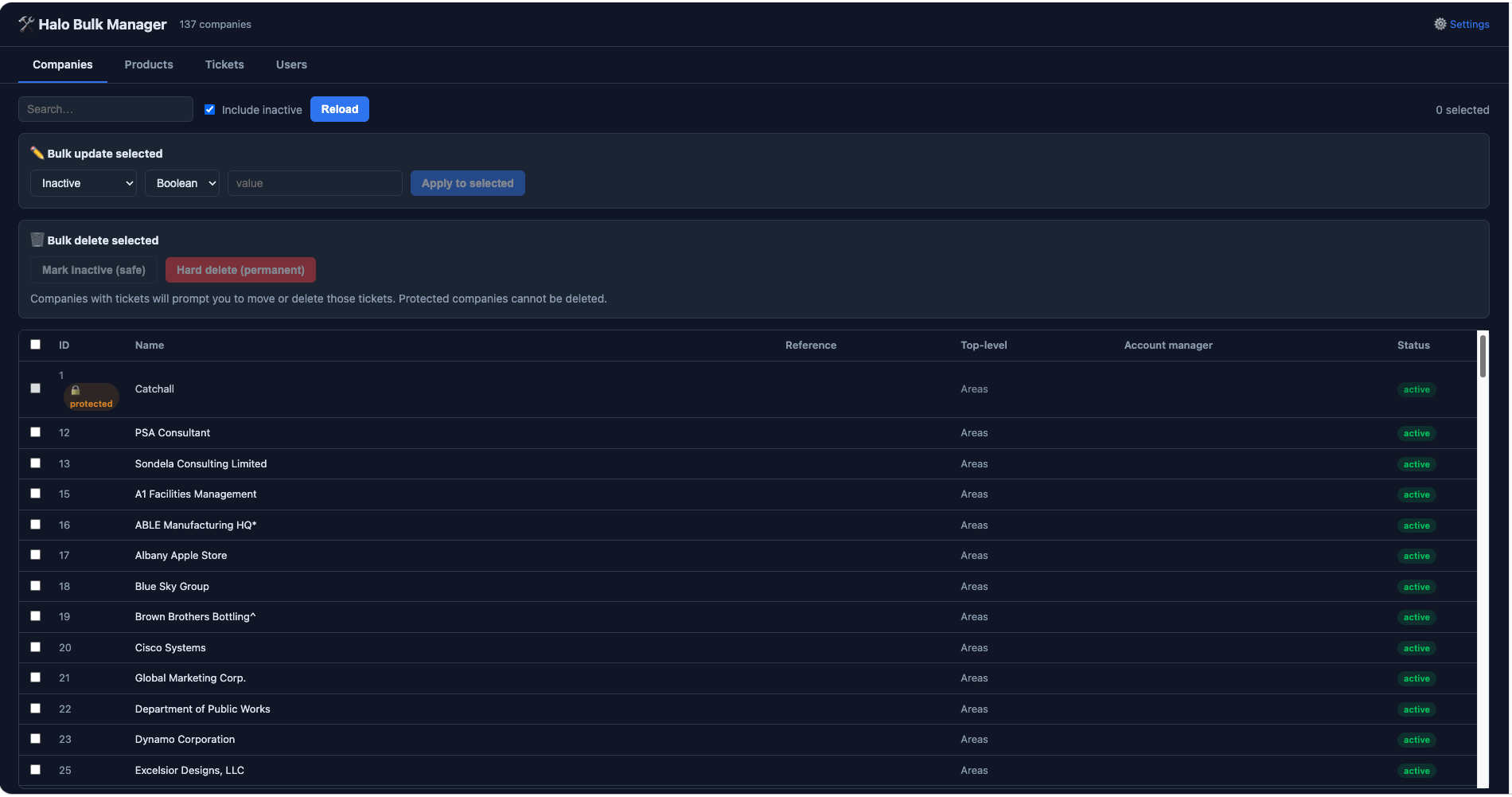
Halo Bulk Manager is a tiny local web app that does it in bulk. It runs on your own machine, talks straight to the Halo API, and gives you a searchable list with tick-boxes:
| Tab | Halo resource | What you can do |
|---|---|---|
| Companies | Client | Search, bulk update any field, mark inactive, hard delete |
| Users | Users | Same, plus filter by company |
| Products | Item | Same, including base price updates |
| Tickets | Tickets | Search, bulk update status/agent/priority, hard delete |
Select some rows, choose a field, set the value, done. Or select some rows and
delete them — with two modes: mark inactive (safe and reversible) or
hard delete (permanent, and it makes you type DELETE to confirm).
It's especially handy after a migration or a botched import, when you're looking
at 400 companies called TEST_IMPORT_00x and a very long afternoon.
It is deliberately boring and safe:
- Runs on
127.0.0.1only — nothing is exposed to your network - Your API credentials never leave your machine
- Company ID 1 (Halo's internal client) can never be deleted, and you can protect more
- Deleting a company checks for tickets first and makes you decide what happens to them — move them to another company, or delete them too
- Halo's own rules still apply: it will refuse to delete clients with linked contracts or invoices, and those refusals are reported back to you per-company
Works on macOS, Windows and Linux.
🎯 Quick Setup (5 Minutes)
Step 1: Check you have Python
You need Python 3.10 or newer.
macOS / Linux:
python3 --version
Windows:
py --version
Nothing there, or older than 3.10? Grab it from https://www.python.org/downloads/. On Windows, tick "Add python.exe to PATH" on the first installer screen — almost every Windows problem with this app traces back to that box.
Step 2: Copy the folder somewhere sensible
Unzip HaloBulkManager.zip wherever you keep tools, e.g.:
- macOS:
~/Tools/HaloBulkManager - Windows:
C:\Tools\HaloBulkManager
Then open a terminal in that folder.
macOS tip: right-click the folder in Finder → Services → New Terminal at Folder. Windows tip: type
cmdinto the address bar of File Explorer and press Enter.
Step 3: Run it
macOS / Linux:
python3 app.py
Windows:
py -3 app.py
That's it — there's no separate install step. On the very first run the app builds its own private virtual environment in the folder and installs its three dependencies into it, then starts:
First run: setting up. This takes about 30 seconds and happens once.

  Creating virtual environment in /Users/you/Tools/HaloBulkManager/.venv
  Installing Flask, requests and python-dotenv
  Done.

  Halo Bulk Manager is running at http://127.0.0.1:5001
  Press Ctrl+C in this window to stop it.
Nothing is installed system-wide — it all lives in the .venv folder next to
the app, and deleting the folder removes every trace. Later runs skip setup
entirely and start in about a second.
Prefer to do it yourself? The manual route still works and is identical to what the app does for you:
python3 -m venv .venv                 # Windows: py -3 -m venv .venv
source .venv/bin/activate             # Windows: .venv\Scripts\activate
pip install -r requirements.txt
python app.py
Step 4: Get your Halo API credentials
In Halo: Configuration → Integrations → Halo API → View Applications → New
| Setting | Value |
|---|---|
| Authentication Method | Client ID and Secret (Services) |
| Login Type | Agent — choose an agent allowed to read/edit/delete clients |
| Permissions tab | at least read:customers and edit:customers |
Note down three things:
- Client ID
- Client Secret
- Halo URL — the root of your instance, e.g.
https://yourcompany.halopsa.com(no trailing slash, no/apion the end)
Step 5: Save your credentials
Your browser opens automatically on the ⚙️ Settings screen. Leave the terminal window open while you use the app — that window is the app, and Ctrl+C in it stops everything.
Enter your Halo URL, Client ID and Client Secret, then click Save & test connection.
Expected result:
✅ Connected — Halo reports 128 companies
You won't be asked again. Credentials are saved to halo_config.json in the
app folder, right next to app.py, so everything stays in one place — easy to
find, easy to back up, and deleting the folder removes every trace.
On macOS and Linux the file is written owner-only (0600).
It's excluded from the release zip and listed in
.gitignore, so it never travels with a copy you share. If you keep the folder in git, double-check.gitignoresurvived your unzip before committing.
🔁 Running it next time
Same command, from the app folder:
python3 app.py # Windows: py -3 app.py
Setup only happens once, so this starts in about a second. No virtual environment
to activate, no pip to remember.
macOS users:
install.commandandstart.commandare included as double-clickable shortcuts for exactly this, if you'd rather not use a terminal. Right-click → Open the first time, to get past Gatekeeper.
🛡️ Protecting records from yourself
Company ID 1 is Halo's own internal client and can never be deleted or
deactivated by this tool. To protect more, copy env.example to .env and set:
HALO_PROTECTED_COMPANY_IDS=1,12,340
Protected companies show a 🔒 in the list and are blocked server-side, not just hidden in the UI.
🆘 Troubleshooting
ModuleNotFoundError: No module named 'dotenv'
You shouldn't see this — the app installs its own dependencies on first run. If you do, automatic setup was blocked (usually no internet, or a locked-down machine). Do it by hand from the app folder:
python3 -m venv .venv                 # Windows: py -3 -m venv .venv
source .venv/bin/activate             # Windows: .venv\Scripts\activate
pip install -r requirements.txt
python app.py
"First run: setting up" appears every time
The app can't find its .venv, so it rebuilds it on each launch. Almost always
means you're running app.py from a different folder than the one it lives in —
cd into the app folder first.
"python: command not found" / "py is not recognised"
Python isn't installed, or isn't on your PATH. On Windows, re-run the Python installer, choose Modify, and tick Add python.exe to PATH.
"externally-managed-environment" when running pip
You're on Homebrew Python and skipped Step 3. Create the virtual environment and
activate it, then pip install again.
macOS: "install.command cannot be opened"
Right-click the file → Open → Open. Gatekeeper only asks once. Or just
follow the terminal steps above and ignore the .command files.
Port 5001 is already in use
The app automatically tries 5002, 5003 and so on, and prints the address it
actually used. To force one: PORT=5055 python app.py.
"Authentication failed" / 401 from Halo
- Check the Client ID and Secret for stray spaces or a missing character
- Confirm Login Type is
Agent, notClient - Confirm the agent has
edit:customerspermission - Check the Halo URL has no trailing slash and no
/apion the end
"Rate Limit Reached - 700 Requests per rolling 5 minute window"
Halo caps API use at 700 requests per rolling 5 minutes, per API application. Nothing is broken and no data is harmed — Halo is just asking you to slow down.
The app now waits and retries automatically (honouring Halo's Retry-After),
so a long run recovers on its own. You'll see this in the terminal:
[halo] rate limited on GET Client — waiting 30s then retrying (1/5)
It matters because deleting companies is request-hungry. For each company the app checks tickets attached to the company, to every one of its sites, and to every one of its contacts — roughly:
2  (list its sites and contacts)
1  (tickets by client)
1  per site      (tickets by site)
1  per contact   (tickets by contact)
A company with 1 site and 5 contacts is about 9 requests, and that check runs twice: once for the warning screen, once during the delete. So plan on ~20 requests per company, i.e. roughly 30–40 companies per 5-minute window.
If you're clearing hundreds, work in batches of about 30 and pause a few minutes between them. Marking inactive instead of deleting is far cheaper — it's a single bulk call for the whole selection.
Halo refuses a delete
Halo blocks deleting clients that still have linked tickets, contracts or invoices. The failures are listed per-company in the UI — clear the links in Halo first, or use Mark inactive instead.
A column is blank for Users, Products or Tickets
Field names vary a little between instances. Adjust the slim_* functions in
entities.py to match yours.
Browser didn't open
Go to the address printed in the terminal, usually http://127.0.0.1:5001.
📚 Documentation
- INSTALL.md — this file, fast setup
- README.md — full documentation, environment variables and file layout
✨ Features
✅ 4 entity types — Companies, Users, Products, Tickets ✅ Cross-platform — same code and same steps on macOS, Windows and Linux ✅ Bulk update — any field, any number of selected rows, one API call ✅ Two delete modes — reversible mark-inactive, or permanent hard delete ✅ Ticket-aware — decides what happens to a company's tickets before removing it ✅ Protected IDs — critical records can't be destroyed by accident ✅ Self-contained — code, venv and credentials all in one folder ✅ Local only — binds to loopback, nothing leaves your machine
⚠️ Before you point this at production
Hard delete is permanent. There is no undo, in this tool or in Halo.
Try it against a sandbox or a test tenant first, use Mark inactive where you can, and take a backup before any large deletion. This tool does exactly what you tell it to, quickly, to a lot of records at once — which is the whole point, and also the whole risk.
🎉 You're Ready!
- ✅ Check Python
- ✅ Create the venv and install requirements
- ✅ Create the Halo API application
- ✅ Run
python app.pyand save your credentials - ✅ Reclaim your afternoon
Questions? See README.md for detailed help, or contact us at support@sondelaconsulting.com
Issues? The Save & test connection button on the Settings screen tells you exactly what Halo is rejecting.
Made with ❤️ by Sondela Consulting
Bulk housekeeping for Halo, without the click-fatigue